
How to Use the Paragraph Rewriter on MyEssayWriter.ai
Effortlessly Refine Your Writing with This Simple Step-by-Step Guide

MyEssayWriter.ai
Last Update hace un año
Want to improve the flow, clarity, or tone of your paragraph? The Paragraph Rewriter on MyEssayWriter.ai is a quick and effective tool to polish your writing with ease.
Whether you’re fine-tuning an essay, editing a business email, or rewriting content for a blog, this tool helps you restructure your paragraph while keeping the original message intact.
Let’s walk you through the steps so you can get started right away!
Step 1: Add Your Paragraph
To begin, just copy and paste the paragraph you want to enhance into the input box. Whether it’s from a school assignment, a report, or an email draft, any type of text works.
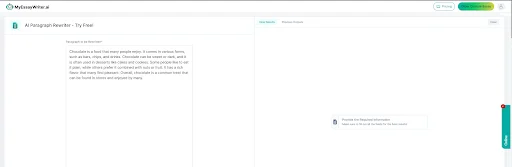
Step 2: Set Your Rewrite Preferences
Next, let the tool know how you want your paragraph to be rewritten by selecting from the customization options under “Why do you want to rewrite?”
- Choose the Tone: Decide whether you want your writing to sound more casual, formal, or professional.
- Refine Language: You can simplify the paragraph or make it more sophisticated—whatever suits your purpose.
- Set Focus Areas: Want to improve sentence flow or word choice specifically? Mention those preferences here.
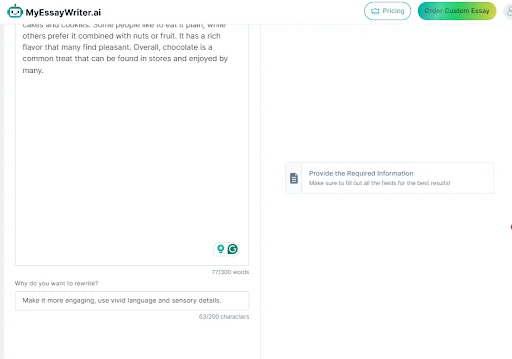
Step 3: Click to Rewrite
Once your settings are in place, hit the ‘Rewrite’ button. In moments, you’ll get a cleaner, clearer version of your paragraph—no need to start from scratch.
Look over the rewritten paragraph to see how it reads. Does it flow better? Does the tone match your intent?
- Check Readability: Ensure that the structure and style align with your goal.
- Make Adjustments: Not quite right? You can tweak the input or try another rewrite with different settings.
When you're satisfied with the result, you can easily:
- Copy: Use the “Copy” button to paste the new paragraph directly into your document.
- Download: Save the output as a file if you want to keep a backup for future reference.
Here are some quick tips to make the most out of the Paragraph Rewriter:
- Start with Clear Paragraphs: Well-structured inputs yield better rewrites.
- Pick the Right Tone: Tailor your tone based on your reader. Use our style and tone suggestor to identify what works best.
- Be Detailed with Preferences: The more guidance you give the tool, the better your output will match your expectations.
- Check for Grammar: For final polish, run your paragraph through our grammar checker.
- Think About Your Audience: Match the paragraph's style and complexity to who will be reading it.
- Experiment with Options: Don’t hesitate to generate multiple versions until you find the perfect fit.
Whether you're a student aiming for better essays or a professional needing cleaner reports, the Paragraph Rewriter helps you write more effectively with less effort.
Ready to enhance your writing? Give the Paragraph Rewriter a try, and if you’re working on bigger projects, check out our AI Essay Writer for even more powerful support.